healthy screen time boundaries for kids
Not all screen time is created equal. The difference between a ‘toy’ and a ‘tool’ is the boundary you set. Boundaries aren’t just about ‘less’ time; they’re about ‘better’ time. Shift your child from a passive consumer to a digital creator with these simple boundary frameworks. #ParentingTips #HealthyTech #ScreenTime
[affiai]Every parent knows the feeling of the “digital hangover.” You hand over a tablet for what you intended to be a quiet twenty minutes, only to find an hour has passed and your child is now irritable, overstimulated, and resistant to transition. The common reaction is to see the device as the enemy, but the reality is more nuanced. Technology is a permanent fixture in modern life, and the goal of healthy parenting in 2026 isn’t just to restrict it, but to mentor our children through it.
Understanding the architecture of a child’s digital world helps us move away from guilt-driven parenting and toward intentional mentorship. When we view devices as tools for creation rather than toys for consumption, the dynamic shifts. We stop counting every second of screen use with dread and start looking at what that time is actually doing to their developing brains. This guide explores how to build a sustainable, creation-focused framework for your family.
healthy screen time boundaries for kids
Healthy screen time boundaries are the structured rules and environmental cues that define when, where, and how a child interacts with digital devices. These boundaries are not meant to be rigid cages; they are the guardrails that allow a child to explore the digital world without falling into the “dopamine loops” designed by engagement-based software. In recent updates to developmental guidelines, experts have moved away from a one-size-fits-all hourly limit to a more holistic “digital ecosystem” approach.
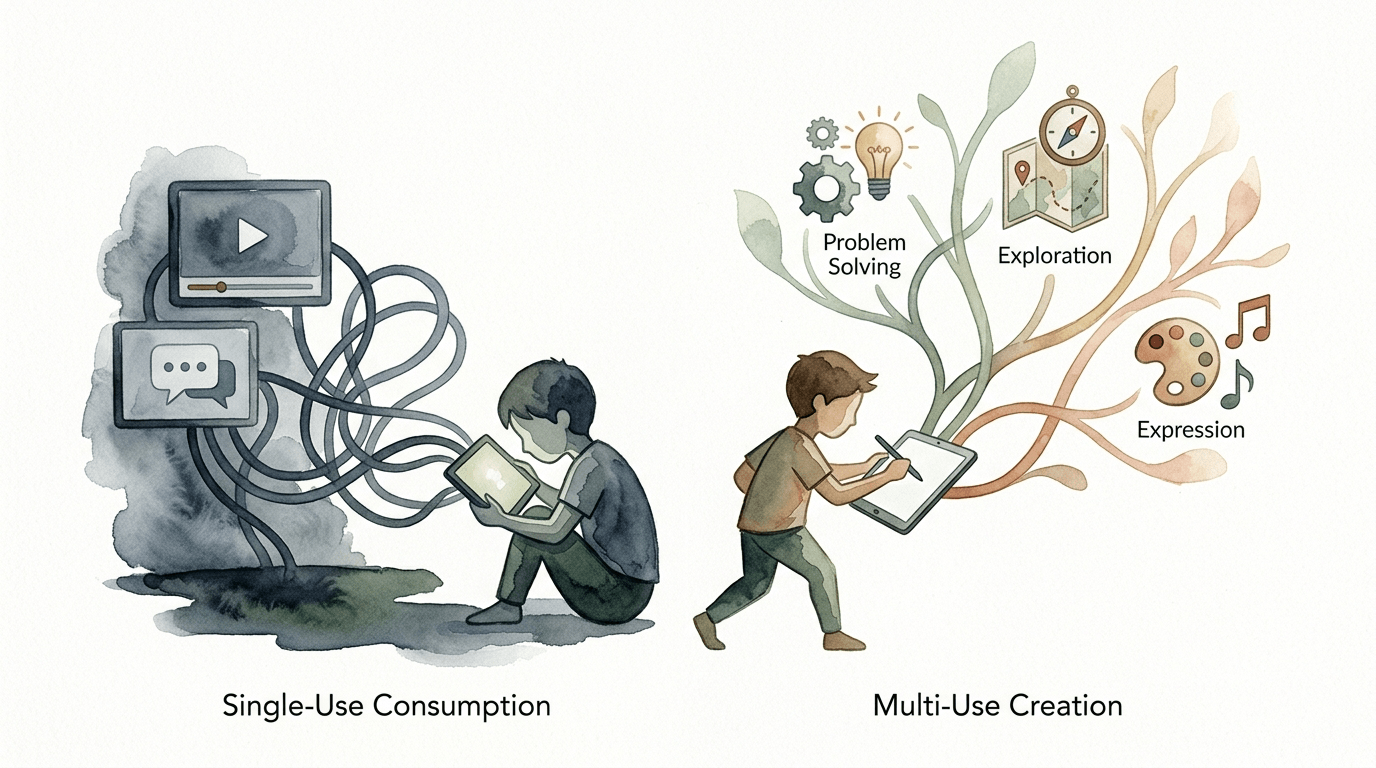
The core philosophy of modern boundaries relies on the distinction between passive consumption and active creation. Passive consumption—often called “digital candy”—includes activities like scrolling through short-form videos or watching endless “unboxing” content. These activities require zero cognitive effort and high levels of sensory input. Healthy boundaries prioritize “digital tools” over “digital toys,” encouraging children to use technology for coding, art, music, or communication rather than just absorption.
Real-world implementation of these boundaries usually centers on age-specific milestones. For infants under 18 months, the consensus remains that screens should be avoided entirely, with the exception of video calls to family members, which provide social connection. Between 18 and 24 months, high-quality educational content should always be co-viewed with a caregiver. For children aged 2 to 5, a limit of one hour per day is recommended, focusing on non-violent, interactive programming. Once children reach school age, the focus shifts to ensuring that screens do not displace essential “offline” pillars: sleep, physical activity, and face-to-face social interaction.
Building a Creation-First Framework
Transitioning your child from a consumer to a creator requires a shift in how devices are presented. A creation-first framework starts with identifying which apps are “open-ended.” These are platforms that allow a child to build, design, or solve problems. Instead of a game that rewards them for simply clicking, they might use a digital canvas for painting or a basic coding platform to build their own game. This process transforms the screen from a passive window into an active workbench.
The first step in this framework is the “Audit of Intent.” Before your child picks up a device, ask them: “What is your plan for this time?” If the answer is “to watch videos,” it falls into the toy category and is subject to stricter time limits. If the answer is “to practice my digital drawing” or “to research how to build a birdhouse,” the boundary can be more flexible. This teaches the child to think about technology as a means to an end rather than the end itself.
Implementing this requires a physical environment that supports focus. Research shows that “technoference”—the interruption of human interaction by devices—is most damaging when screens are present in bedrooms or at the dinner table. Establishing “Tech-Free Zones” ensures that the most critical developmental spaces remain focused on human connection. By keeping screens in common areas, you naturally encourage co-engagement and make it easier to monitor the transition from creation back to consumption.
Benefits of Active Digital Engagement
Shifting toward active screen use offers measurable benefits for cognitive development. When children use technology as a tool, they engage in “higher-order thinking.” This includes planning, sequencing, and debugging—skills that are essential for problem-solving in the real world. A child who spends an hour editing a stop-motion video is exercising far more executive function than a child who spends an hour watching cartoons.
Social-emotional growth is another significant advantage. Digital tools can facilitate “co-creation,” where siblings or friends work together on a project. This turns screen time into a collaborative experience rather than an isolating one. Recent studies have shown that high-quality, interactive media can actually support early literacy and language development when paired with adult conversation, as it provides a shared context for learning new concepts.
Long-term digital literacy is perhaps the most practical benefit. Children who learn to navigate the digital world as creators are less likely to be manipulated by algorithms as they grow older. They understand that content is “made,” which fosters a healthy level of skepticism and critical thinking. This foundation helps them develop a “multi-use” mindset, where they see technology as a resource for life-long learning rather than just a source of entertainment.
Challenges and Common Mistakes
One of the most frequent errors parents make is using screen time as a primary emotional regulator. When a child is upset or bored, the immediate relief of a device is tempting. However, this teaches the child that they cannot manage their own emotions without external stimulation. Over time, this can weaken their “internal regulation” skills, leading to more frequent meltdowns when the device is finally turned off.
Consistency is another major hurdle. Boundaries that are enforced strictly on Monday but ignored on Tuesday create confusion and pushback. Children thrive on predictability. If the rules change based on the parent’s energy levels, the child will continually test those rules to see where the current line is drawn. This inconsistency often results in the “battle of the tablet” that many families find so exhausting.
Failing to model healthy behavior is a subtle but powerful pitfall. If a parent tells a child to put their phone away while the parent is simultaneously scrolling through social media, the message is lost. Children are acute observers of “do as I say, not as I do.” Modeling a “digital sunset”—where the whole family puts devices away an hour before bed—is far more effective than any individual rule you could set for your child.
Limitations of Boundary Setting
Boundaries are not a silver bullet for all behavioral issues. In some cases, a child’s intense reaction to screens may be a symptom of an underlying issue, such as neurodivergence or anxiety, rather than just “too much time.” For these children, traditional time-based limits might not be enough. They may require specialized support to manage the sensory overstimulation that digital environments provide.
Environmental factors also play a role. Families living in small spaces without easy access to safe outdoor play may find it harder to enforce strict “no screen” rules. In these situations, the focus must shift entirely to quality rather than quantity. If the screen is the only safe recreational outlet available for a few hours, ensuring that the content is pro-social and creative becomes the priority.
Finally, there is the reality of the “Digital Ecosystem.” In 2026, technology is deeply integrated into schoolwork and social lives. It is no longer possible to simply “turn off the internet.” This means that boundaries must evolve as the child gets older. A boundary that worked for a seven-year-old will feel like a cage to a fourteen-year-old. The limitation of any rule-based system is that it eventually needs to be replaced by “internalized values.”
Comparison: Digital Toy vs. Digital Tool
To help visualize the difference between these two categories, consider how they interact with a child’s brain and time. The following table breaks down the key differences between passive consumption (Toy) and active creation (Tool).
| Feature | Digital Toy (Passive) | Digital Tool (Active) |
|---|---|---|
| Goal | Entertainment / Distraction | Creation / Learning |
| Brain State | Reactive (Theta/Alpha waves) | Engaged (Beta waves) |
| Duration | Often endless (Autoplay) | Task-oriented (Project-based) |
| Output | None (Consumption only) | Something new (Art, code, video) |
| Dopamine | Short, frequent spikes | Sustained, reward-for-effort |
Practical Tips for Implementation
Start with a “Digital Sunset.” Turn off all screens at least 60 minutes before bedtime. This allows the child’s body to naturally produce melatonin, which is suppressed by the blue light emitted from devices. Use this time for low-stimulation activities like reading, board games, or gentle conversation. This routine helps reset the nervous system and leads to significantly better sleep quality.
Use “External Timers” instead of parental verbal warnings. When you say “five more minutes,” it can feel like an arbitrary attack on their fun. When a physical kitchen timer or a built-in app timer goes off, the device itself is “ending the session,” which reduces parent-child conflict. Allow the child to set the timer themselves to give them a sense of agency over the transition.
Categorize your apps using folders labeled “Tools” and “Toys.” Place all creation-based apps (like drawing or coding) in the Tools folder and more passive games or streaming apps in the Toys folder. During the week, you might only allow access to the Tools folder, saving the Toys for specific “bonus” times on the weekend. This visual organization reinforces the idea that some apps are for work/growth and others are for pure play.
Engage in “Media Mentorship.” Instead of just monitoring what they watch, sit down and watch it with them once a week. Ask questions: “Why do you think that character did that?” or “How do you think they made that video look so cool?” This turns a passive activity into an active discussion and helps you understand the “Digital Ecosystem” your child is living in.
Advanced Considerations for the Modern Age
For serious practitioners of digital wellness, understanding the “Neurology of Engagement” is key. Software companies spend billions of dollars on “persuasive design”—features like red notification dots, infinite scrolling, and variable rewards that keep the brain hooked. Teaching your children about these features is an advanced form of digital literacy. When a child can say, “Oh, the app is trying to keep me here with that shiny button,” they have achieved a level of digital autonomy that most adults lack.
Consider the role of Artificial Intelligence (AI) in your child’s boundaries. AI tools can be incredible partners for creation, but they can also bypass the hard work of learning. An advanced boundary might involve allowing AI for brainstorming a story but requiring the child to do the actual writing. The goal is to ensure the “creative spark” remains with the human while the tool handles the mechanical heavy lifting.
Neurodiversity requires a highly personalized approach. For children with ADHD or Autism, screens can provide a “safe” sensory environment where rules are consistent and predictable. However, these children are also more susceptible to the “dopamine loops” of gaming. Advanced boundaries for neurodiverse kids often involve “interstitial activities”—breaks every 15 minutes to do a physical movement or drink water—to prevent the hyper-focus that makes transitions so difficult.
Scenarios and Practical Applications
Imagine a Saturday morning. Instead of the usual hour of mindless cartoon watching, you challenge your child to a “Creative Sprint.” You tell them, “You have 45 minutes on the tablet, but the goal is to find a recipe for a healthy snack and then we are going to go make it together.” In this scenario, the screen is used as a research tool. The activity starts digitally but ends physically, creating a bridge between the two worlds.
In another scenario, a ten-year-old wants to play a popular online building game. Instead of a hard “no” or an unlimited “yes,” you set a project boundary: “You can play for an hour if you spend the first 20 minutes building a replica of our house or a historic monument.” This forces the child to use the game’s mechanics for a specific, constructive purpose rather than just wandering aimlessly through the digital world.
Consider the “Public Space Boundary.” When traveling or eating out, it’s common to use a screen as a “digital pacifier.” To apply the creation framework here, swap out the movie for an app that lets them take photos and edit them into a digital travel diary. They are still using the screen to stay quiet, but they are actively observing their environment and processing their experiences through a creative lens.
Final Thoughts
Setting healthy screen time boundaries is a marathon, not a sprint. It requires constant adjustment as your child grows and the digital landscape shifts. By focusing on the “Quality over Quantity” mantra and prioritizing the “Digital Tool” over the “Digital Toy,” you are giving your child the skills they need to thrive in a tech-saturated world. You are moving from being a “Digital Gatekeeper” to a “Digital Mentor.”
Remember that the most important part of any boundary is the “connection” it protects. Screens are often used to fill the gaps where we are too busy or too tired to engage, and that is okay in moderation. However, the ultimate goal of these frameworks is to ensure that when the screens go dark, your child still knows how to be bored, how to be curious, and how to connect with the people standing right in front of them.
Encourage your child to experiment with their own limits. Ask them how they feel after an hour of YouTube versus an hour of building something new. When they start to recognize the “digital hangover” for themselves, you know your work as a mentor is succeeding. Start small, stay consistent, and watch as your child transforms from a passive consumer into a confident digital creator.
Sources
1 expressable.com (https://www.expressable.com/learning-center/speech-and-language-issues/active-vs-passive-screen-time-what-parents-need-to-know) | 2 ummhealth.org (https://www.ummhealth.org/health-library/setting-screen-time-limits-for-children-and-teens) | 3 myhspediatrics.com (https://myhspediatrics.com/screen-time-your-childs-brain-healthy-habits-for-2025/) | 4 healthychildren.org (https://www.healthychildren.org/English/family-life/Media/Pages/helping-kids-thrive-in-a-digital-world-AAP-policy-explained.aspx) | 5 cacfp.org (https://www.cacfp.org/2025/07/07/reducing-screen-time/) | 6 childrenandscreens.org (https://www.childrenandscreens.org/learn-explore/research/are-some-types-of-screen-time-better-than-others/) | 7 qut.edu.au (https://eprints.qut.edu.au/56494/3/56494.pdf) | 8 digitalwellnessresources.com (https://digitalwellnessresources.com/resource/setting-boundaries-healthy-screen-time-limits-for-children/) | 9 nih.gov (https://pubmed.ncbi.nlm.nih.gov/41929787/) | 10 lelycee.org (https://www.lelycee.org/about/news/news-post/~board/blog/post/raising-digital-creators-encouraging-your-child-to-build-not-just-consume) | 11 cincinnatichildrens.org (https://scienceblog.cincinnatichildrens.org/screen-usage-linked-to-differences-in-brain-structure-in-young-children/)