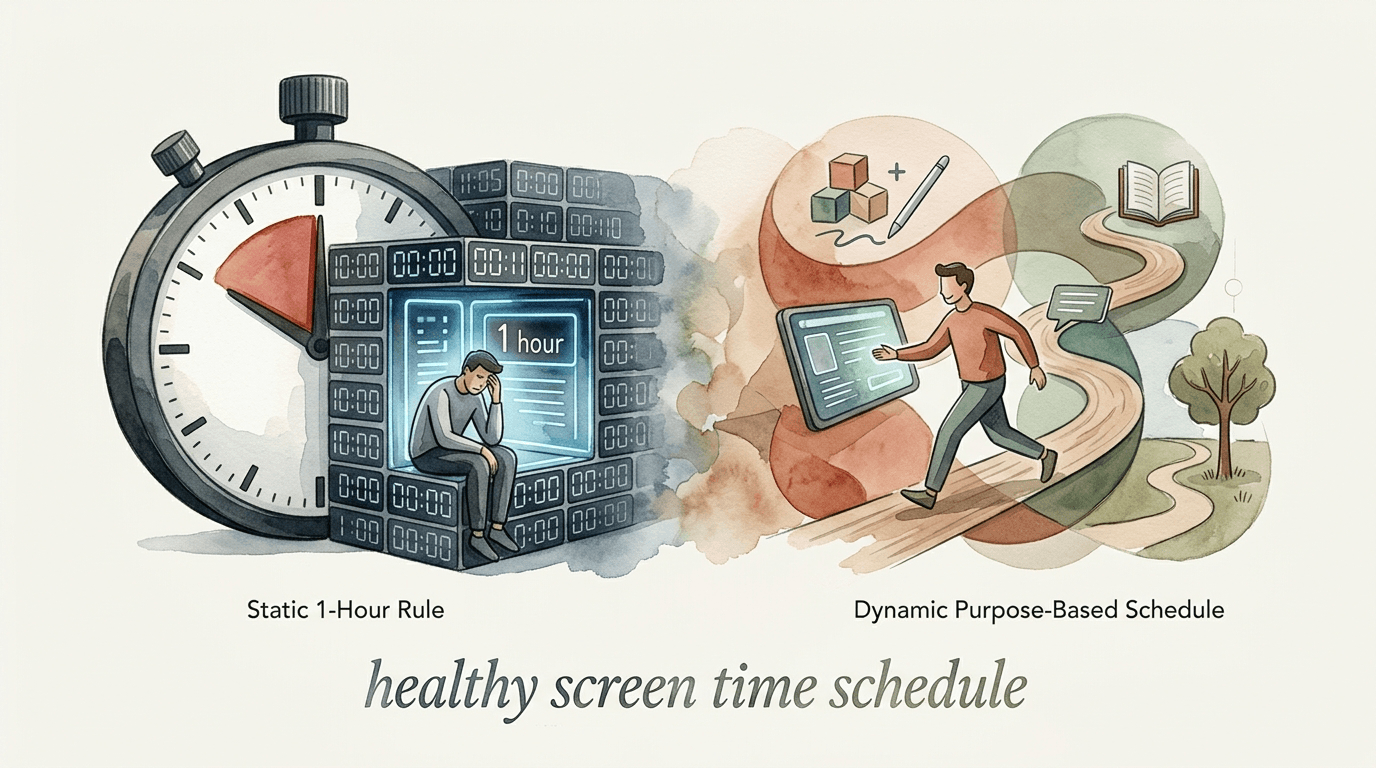
healthy screen time schedule
Rigid time limits fail because they treat ‘learning’ and ‘scrolling’ as the same thing. Switch to a dynamic schedule. Not all minutes are equal. A dynamic schedule allows for more ‘creation’ time and less ‘zombie’ time. Here is how to categorize your family’s digital day. #Scheduling #TimeManagement #FamilySystems
[affiai]Most screen time arguments happen because parents and kids are speaking two different languages. Parents see a “screen” as a single, glowing distraction. Kids see a portal to their friends, their hobbies, and their schoolwork. When we set a hard 60-minute timer, we accidentally tell our kids that coding a video game is exactly as valuable as mindlessly watching YouTube shorts.
The old “1-hour rule” is a relic from the television era. Back then, “screen time” meant sitting on a couch and absorbing whatever a network executive decided to broadcast. Today, the digital world is an ecosystem. It is where your child learns to play the piano, researches their history project, and builds complex 3D worlds. Treating these activities the same as endless scrolling creates unnecessary friction and stunts digital growth.
Shifting to a dynamic, purpose-based schedule removes the “bad parent” guilt. It focuses on what a child is actually doing rather than just how long they have been doing it. This guide will show you how to move from being a “time cop” to being a “digital mentor.”
healthy screen time schedule
A healthy screen time schedule is a flexible framework that prioritizes the quality and context of digital use over a simple countdown. In 2026, the American Academy of Pediatrics (AAP) officially shifted its guidance away from strict hour-based limits for older children. Experts now emphasize “balanced screen use” that considers how digital media fits into a child’s socio-ecological system.
Think of it like a nutritional diet. You do not just count “minutes spent eating.” You look at the balance of proteins, vegetables, and sugars. In the digital world, “vegetables” are educational tools and creative apps. “Sugars” are passive scrolling and autoplaying videos. A healthy schedule ensures the “nutritional” activities are not crowded out by “digital candy.”
This approach works by categorizing digital activities into four buckets: Passive Consumption, Interactive Play, Creative Production, and Social Connection. Real-world implementation involves setting different “budgets” for each bucket. A child might have a strict limit on YouTube (Passive) but unlimited access to a digital art suite (Creative). This encourages them to use the device as a tool rather than just a toy.
The Four Buckets of Digital Life
To build a dynamic schedule, you must first understand what your child is doing when they are “on their phone.” Not all apps are created equal. Use these four categories to audit your current family habits.
1. Passive Consumption (The “Zombie” Zone)
Passive consumption is when a child receives information without interacting with it. Examples include watching Netflix, scrolling TikTok, or viewing YouTube Shorts. This category has the highest risk of “displacement,” where it starts to replace sleep, exercise, and face-to-face talk. Most families should keep this bucket under strict limits, as it often relies on “engagement-based designs” like autoplay that are hard for a child’s brain to resist.
2. Interactive Play (The “Engagement” Zone)
Interactive play involves active participation. This includes video games like Minecraft or Roblox, strategy games, or interactive puzzles. While these are still recreational, they require problem-solving, spatial reasoning, and often teamwork. Research suggests that interactive screen time is better for maintaining attention than passive viewing. Limits here should be moderate but firm.
3. Creative Production (The “Creator” Zone)
Creative production is the “gold standard” of screen time. This is when a child uses a device to make something: coding in Scratch, editing a video, composing music, or digital painting. These activities build high-level cognitive skills. Many modern families allow significantly more time for this bucket—or even leave it “off the clock”—to encourage the transition from consumer to creator.
4. Educational and Social Connection (The “Essential” Zone)
This bucket includes homework, research, and video-chatting with family members. Following the 2026 AAP updates, video calls are generally excluded from time limits, even for toddlers. These activities are tools for life and should be managed based on the child’s needs and responsibilities rather than a stopwatch.
How to Implement a Purpose-Based Schedule
Moving to this system requires a conversation, not just a new setting in an app. You are teaching your child how to categorize their own time. This builds internal self-regulation, which is a vital skill they will need as adults.
Start by holding a family meeting to explain the new “buckets.” Ask your child to look at their most-used apps and decide which bucket they belong in. You might be surprised to find they view Minecraft as “work” because they are building a complex redstone machine. Listen to their reasoning. This buy-in is critical for the system to work long-term.
Establish “Hard Cutoffs” and “Soft Budgets.” A hard cutoff is a time when all screens go away—usually 60 minutes before bed. A soft budget is the time allotted for different buckets. For example, 30 minutes of “Zombie Time” (Passive) and 90 minutes of “Play Time” (Interactive). If they want more time on the tablet, they can “earn” it by switching to a “Creator” app.
Use a “Flow Chart” system for younger kids. Before they ask for the iPad, they should check off their “Life Basics”: chores done, 30 minutes of physical play, and homework finished. This teaches them that screens are a part of a balanced day, not the centerpiece of it. Several educators now offer customizable flow charts to help kids navigate these transitions without a power struggle.
Benefits of a Dynamic Schedule
Switching from rigid timers to purpose-based scheduling offers immediate psychological relief for the whole house. It stops the “countdown anxiety” that often leads to tantrums when the screen suddenly turns off mid-game.
- Reduced Power Struggles: When kids understand the *why* behind a limit, they are less likely to fight it. They know they have “limitless” time for creativity, which shifts their focus toward productive uses.
- Better Digital Literacy: Children learn to recognize the difference between a high-dopamine “scroll loop” and a meaningful creative session. This awareness is the foundation of long-term digital wellness.
- Improved Mental Health: By limiting passive consumption—which is most strongly linked to depression and anxiety in 2025 studies—you protect your child’s emotional baseline.
- Skill Development: Encouraging “Creator” time leads to tangible skills. A child who spends two hours a day in a video editor is gaining career-relevant experience.
This system also encourages “co-viewing” and “co-playing.” When parents engage with their kids’ digital worlds, the device becomes a bridge for connection rather than a wall. Research from 2026 highlights that the context of use—using a device *with* an adult—is one of the best ways to mitigate the potential harms of screens.
Challenges and Common Mistakes
The biggest hurdle in a dynamic schedule is the “Grey Area” apps. Some apps, like YouTube, can be both passive (watching cartoons) and creative (watching a tutorial to learn a new skill). Parents often struggle to differentiate between the two, which can lead to “fairness” arguments.
Another common mistake is the “Forbidden Fruit” effect. Being too restrictive with even passive media can make it more desirable. Psychology studies show that children whose parents strictly forbid sweets often overindulge when given the chance. The same applies to screens. If you treat YouTube like a “sin,” your child may find ways to hide their usage rather than learning to manage it.
Relying solely on software is a frequent pitfall. Apps like Apple Screen Time or Qustodio are great tools for data, but they cannot replace a parent’s eyes and ears. If you just set the app and walk away, your child will likely find workarounds. Use the software as a “safety net,” not as the primary disciplinarian.
Ignoring your own “Digital Modeling” is a recipe for failure. If you tell your child to stop “Zombie Scrolling” while you are scrolling through Instagram at the dinner table, the lesson is lost. A dynamic schedule must be a family-wide commitment. Designate “Tech-Free Zones” like the dining room to reinforce these boundaries for everyone.
Limitations and Age Boundaries
A dynamic schedule is not a free-for-all. Realistic constraints must still exist, especially for the youngest children whose brains are in a high state of neuroplasticity. The AAP 2026 guidelines still recommend no screen time (except video calls) for children under 18 months.
For kids aged 2 to 5, the “one-hour rule” still has merit. At this stage, the brain needs massive amounts of tactile, real-world interaction to develop motor skills and social empathy. Even “Creative” screen time should be limited because it cannot replace the developmental value of playing with physical blocks or drawing on paper.
Physical health is a hard boundary that software cannot track effectively. No matter how “productive” the screen time is, it remains a sedentary activity. A dynamic schedule must still mandate “Green Time”—time spent outdoors—to balance the digital intake. 2025 research from JAMA Pediatrics shows that screen time’s negative effects are often mediated by a lack of sleep and physical movement. If the screen is displacing sleep, the “buckets” no longer matter; the device must be put away.
Static 1-Hour Rule vs. Dynamic Purpose-Based Schedule
| Feature | Static 1-Hour Rule | Dynamic Schedule |
|---|---|---|
| Primary Metric | Minutes elapsed | Content quality & Purpose |
| Conflict Level | High (Daily arguments) | Low (Negotiated boundaries) |
| Skill Building | Limited (Treats all use as play) | High (Prioritizes “Creator” mode) |
| Long-term Goal | Avoidance/Abstinence | Self-Regulation/Digital Wisdom |
| Complexity | Simple to set up | Requires active parenting |
Practical Tips and Best Practices
Implementing a healthy screen time schedule is a journey, not a one-time event. Use these best practices to refine your system as your children grow and their digital needs evolve.
- Use “Device-Free” Transitions: Research indicates that the hardest part of screen time is the “stop.” Implement a 5-minute warning, and then follow it with a physical transition like a snack or a quick walk to reset the brain’s dopamine levels.
- Leverage Built-in Tools: Use Apple’s Screen Time or Android’s Digital Wellbeing to set “App Categories.” You can set a strict 30-minute limit on the “Social Media” category while leaving “Education” and “Creativity” apps unrestricted.
- The “Bedroom Rule” is Non-Negotiable: Regardless of the schedule, screens should stay out of bedrooms at night. Sleep is the single most important factor in a child’s mental health. A 2025 study found that a screen-free bedroom is more effective for mental health than any specific time limit.
- Reward Productivity: Consider an “Earn Your Time” model. For every 30 minutes spent on a “Creator” app or doing chores, they earn 15 minutes of “Zombie Time.” This reframes passive consumption as a treat rather than a right.
- Conduct Monthly Audits: Every few weeks, sit down and look at the “Weekly Report” together. Ask your child what they felt was the most valuable thing they did on their screen that week. This reinforces the idea of intentionality.
Advanced Considerations: The Dopamine Loop
Serious practitioners of digital wellness need to understand the mechanics of “engagement-based design.” Many modern apps are designed to exploit “variable reward schedules.” This is the same mechanism used in slot machines. When a child scrolls through YouTube Shorts, they do not know when the next “hit” (a funny or exciting video) will come, so they keep scrolling.
As a parent, you can teach your child about these “dark patterns.” Explain how autoplay and notifications are designed to steal their attention. When a child understands that they are being “hacked” by a multi-billion dollar company, they often develop a sense of resistance. This is “Critical Digital Literacy.”
Consider the role of AI tools. In 2025 and 2026, AI-integrated learning tools have become common. These fall into the “Educational” bucket, but they require a new type of supervision. Ensure the AI being used is “Kid-Safe” and COPPA-compliant. These tools can be incredible for personalized learning, but they should be used in common areas where you can see how the child is interacting with the AI.
Example Scenarios
Let’s look at how two different families might handle a typical Saturday using a dynamic schedule versus a static one.
Scenario A: The 2-Hour Static Limit
The timer starts at 10:00 AM. The child spends 90 minutes watching unboxing videos on YouTube and 30 minutes playing a game. At 12:00 PM, the device locks. The child is frustrated because they were in the middle of a level. The rest of the afternoon is spent in a “post-screen grump” because they have “nothing else to do.” Total outcome: 100% consumption, high friction.
Scenario B: The Dynamic Schedule
The family has a “Creation First” rule. The child spends 45 minutes coding a new game in Scratch (Creator bucket—unlimited time). They then spend 30 minutes on a video call with their cousin (Connection bucket—off the clock). After lunch, they use their 45-minute “Zombie Budget” to watch YouTube. Because they used the device purposefully all morning, the 45-minute cutoff feels fair. Total outcome: High skill development, high social connection, low friction.
Final Thoughts
A healthy screen time schedule is not about doing “less” on screens; it is about doing “better.” By shifting from a focus on minutes to a focus on meaning, you empower your child to become a master of their digital environment rather than a victim of it. This framework acknowledges that technology is an integral part of modern life and provides the tools to navigate it with wisdom.
Remember that the goal is self-regulation. One day, your child will be an adult with a smartphone and no one to set a timer for them. The lessons you teach today about “buckets” and “intentionality” are the skills that will protect their mental health for decades to come. Do not be afraid to experiment, tweak the budgets, and admit when a certain app is causing more harm than good.
Start today by choosing just one category—like “Creator Time”—and making it a priority. Watch how the energy in your home shifts when the screen becomes a canvas instead of just a distraction. Your family’s digital wellness is a marathon, not a sprint, and every step toward intentionality is a win.
Sources
1 bklynlibrary.org (https://static.bklynlibrary.org/prod/public/documents/4181_BM_Family%20Media%20Plan_6-spreads.pdf) | 2 kinzoo.com (https://www.kinzoo.com/blog/how-much-screen-time-is-okay-for-kids-in-2026-what-the-experts-actually-recommend) | 3 parentaledge.com (https://parentaledge.com/blog/screen-time-guidelines-by-age) | 4 expressable.com (https://www.expressable.com/learning-center/speech-and-language-issues/active-vs-passive-screen-time-what-parents-need-to-know) | 5 healthychildren.org (https://www.healthychildren.org/English/family-life/Media/Pages/helping-kids-thrive-in-a-digital-world-AAP-policy-explained.aspx) | 6 heyotto.app (https://www.heyotto.app/blog/the-complete-guide-to-screen-time-for-kids) | 7 heyotto.app (https://www.heyotto.app/blog/the-complete-guide-to-screen-time-for-kids) | 8 pewresearch.org (https://www.pewresearch.org/internet/2025/10/08/how-parents-approach-their-kids-screen-time/) | 9 childrenandscreens.org (https://www.childrenandscreens.org/learn-explore/research/are-some-types-of-screen-time-better-than-others/) | 10 qustodio.com (https://www.qustodio.com/en/blog/how-much-screen-time/) | 11 aap.org (https://www.aap.org/en/patient-care/media-and-children/center-of-excellence-on-social-media-and-youth-mental-health/qa-portal/qa-portal-library/qa-portal-library-questions/screen-time-guidelines/) | 12 choc.org (https://health.choc.org/updated-aap-recommendations-for-screen-time/) | 13 choc.org (https://health.choc.org/updated-aap-recommendations-for-screen-time/) | 14 choc.org (https://health.choc.org/updated-aap-recommendations-for-screen-time/) | 15 reddit.com (https://www.reddit.com/r/productivity/comments/1in4cbw/my_honest_review_of_screen_time_management_apps/) | 16 psychologytoday.com (https://www.psychologytoday.com/us/blog/video-game-health/202311/how-to-set-screen-time-rules-for-your-family) | 17 recordablebookbuddy.com (https://recordablebookbuddy.com/blogs/read-to-me/what-2025-research-says-about-kids-and-screens-and-why-screen-free-storytime-still-wins) | 18 mayoclinic.org (https://www.mayoclinic.org/healthy-lifestyle/childrens-health/in-depth/screen-time/art-20047952)