healthy screen time for kids
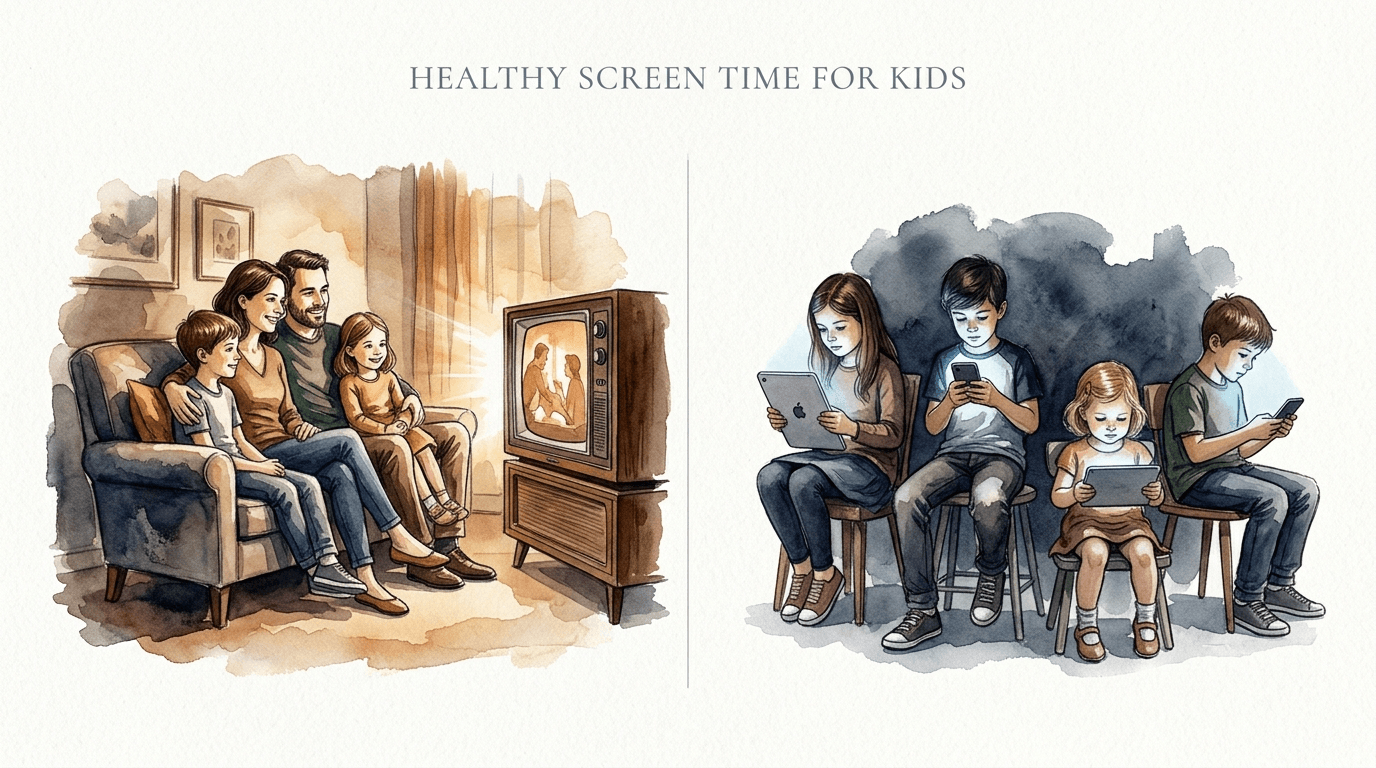
Screen time used to be a shared experience. Now, it’s a silent isolation. Here’s how to bring the balance back. In the ‘Then’ era, screens were limited by the living room. ‘Now,’ they follow us everywhere. Reclaiming healthy screen time for kids means bringing back the shared experience. #90sVsNow #TechBalance #ChildDevelopment
[affiai]The transition from the family television to the personal tablet has fundamentally changed how children grow up. In the 1990s, watching a show was a collective ritual involving the whole family on one couch. Today, it is often a solitary activity, with each child lost in a personalized algorithmic feed that shifts every few seconds.
This shift matters because screen time is no longer just about the “amount” of time spent. It is about the quality of the content and the context in which it is consumed. By understanding the science of co-viewing and digital wellness, you can transform technology from a source of isolation into a tool for connection.
Reclaiming this balance isn’t about banning technology or living in the past. It’s about being intentional in a world designed to grab our attention. We are moving from a “limit-first” mindset to a “quality-first” approach that prioritizes development over distraction.
healthy screen time for kids
Healthy screen time for kids is defined as digital engagement that supports cognitive, social, and physical development rather than displacing it. In 2024 and 2025, experts have shifted away from rigid “minutes per day” rules to a more nuanced framework called the “Three Cs”: Content, Context, and the individual Child.
This approach recognizes that one hour of video-chatting with a grandparent or learning to code is fundamentally different from one hour of mindlessly scrolling through short-form video feeds. Healthy use involves high-quality, age-appropriate content that is often shared with a caregiver to facilitate “serve and return” interactions.
Real-world examples of healthy screen time include family movie nights, educational games that require problem-solving, or using a tablet to follow a craft tutorial. When screens are used as a bridge to real-world activity or social bonding, they serve a positive purpose in a child’s ecosystem.
Conversely, unhealthy screen time is characterized by passive consumption of overstimulating content. This often occurs when screens are used as a “digital pacifier” for long periods, leading to the displacement of essential activities like physical play, face-to-face conversation, and restorative sleep.
The Evolution: Collective Viewing vs. Isolated Feeds
To understand why screen time feels more difficult to manage today, we must look at how the delivery of media has evolved. In the 90s, screen time was stationary and scheduled. You had to be in the living room at 8:00 AM on a Saturday to catch your favorite cartoon.
This built-in “friction” made it easier to manage. Once the show was over, the screen went dark. Because there was only one TV, children often had to negotiate with siblings or parents about what to watch, fostering early social skills like compromise and patience.
Today, screens are mobile and on-demand. There is no natural stopping point. Algorithms are designed with “engagement-based design,” using features like autoplay and infinite scrolls to keep eyes on the glass. This removes the “shared” element and replaces it with an “isolated” experience where each user is in their own digital silo.
The Comparison of Eras
| Feature | The “Then” Era (90s) | The “Now” Era (2020s) |
|---|---|---|
| Location | Stationary (Living Room) | Mobile (Pockets, Bedrooms) |
| Availability | Scheduled (TV Guides) | On-Demand (Streaming/Apps) |
| Social Context | Collective/Shared | Isolated/Individual |
| End Point | Natural (Show Ends) | Artificial (Infinite Scroll) |
How to Reclaim the Balance: A Step-by-Step Guide
Reclaiming healthy screen time starts with a shift in your household’s digital culture. It requires moving from being a “gatekeeper” to being a “mentor” who guides children through the digital landscape. Follow these steps to build a sustainable family media plan.
Step 1: Conduct a Digital Audit
Track your family’s current usage for three days. Don’t just look at the hours; look at the “why.” Are screens being used for boredom, education, or as a transition tool? Understanding the current baseline helps you identify where the biggest “time leaks” are occurring.
Step 2: Define Device-Free Zones and Times
Establish clear boundaries where screens are never allowed. The most critical zones are the dinner table and bedrooms. Keeping screens out of bedrooms ensures that sleep—the most vital factor in brain development—is protected from the blue light and stimulation of devices.
Step 3: Implement the “Co-Viewing” Model
Whenever possible, watch or play alongside your child. Ask open-ended questions like, “Why do you think that character did that?” or “What do you think happens next?” This transforms a passive experience into an active, language-rich interaction that supports cognitive growth.
Step 4: Curate the Content Library
Move away from open-access platforms like the main YouTube app in favor of curated options like PBS Kids or age-appropriate streaming profiles. Prioritize “slow media”—shows or games with slower pacing and clear educational goals—over high-intensity “hyper-stimulant” content.
Benefits of a Balanced Approach
When families transition to a “shared experience” model of technology, the developmental benefits are measurable. Children who engage in co-viewing with parents show higher levels of vocabulary acquisition and better reading comprehension compared to those who watch alone.
Beyond cognitive gains, balanced screen time improves emotional regulation. By limiting overstimulating “fast-paced” content, children are less likely to experience the “screen-time crash”—the irritability and tantrums that often occur when a high-dopamine activity is suddenly stopped.
Stronger family bonds are perhaps the most immediate benefit. When tech is used as a tool for connection—like playing a collaborative video game or looking up a recipe together—it reinforces the idea that the person sitting next to you is more important than the device in your hand.
Challenges and Common Mistakes
One of the most frequent mistakes is using screen time as a reward or punishment. This inadvertently “gamifies” technology, making it seem like a precious prize and increasing its allure. It’s better to treat screen time as a routine part of the day, much like dessert—enjoyable in moderation, but not the main course.
Another challenge is the “distracted parent” phenomenon. Children are highly sensitive to their parents’ digital habits. If you are constantly checking your phone during family time, your child will learn that digital engagement takes priority over human interaction. Modeling the behavior you want to see is essential.
Finally, many parents fall into the trap of relying on parental control apps as a total solution. While these tools are helpful for setting “hard stops,” they cannot replace the “soft skills” of digital literacy. A child who is only restricted by a timer won’t learn how to self-regulate when that timer is eventually removed.
Limitations and Realistic Constraints
It is important to acknowledge that a “perfect” screen-time balance is not always possible. Modern life often demands that parents use screens as a temporary tool to manage household tasks or work-from-home requirements. In these situations, the goal is “harm reduction” rather than perfection.
Environmental factors also play a role. Families living in areas with limited access to safe outdoor spaces may rely more heavily on digital entertainment for safety. In these cases, focus on maximizing the “active” and “social” components of screen use rather than strictly adhering to time limits.
Furthermore, as children enter adolescence, the social “cost” of being offline increases. For teens, screens are often their primary social hub. Cutting them off entirely can lead to social isolation. The strategy must evolve from “limiting time” to “mentoring content” as the child grows.
Practical Tips for Daily Digital Wellness
Small changes in how you handle technology can lead to big shifts in your child’s behavior. Use these actionable strategies to optimize your home environment.
- Use the “20-20-20 Rule”: To prevent eye strain, encourage your child to look at something 20 feet away for 20 seconds every 20 minutes.
- Turn Off Autoplay: This simple setting change on Netflix or YouTube prevents the “just one more” cycle by creating a natural pause between videos.
- Narrate Your Tech Use: When you use your phone, tell your child why. Say, “I’m checking the weather for our walk,” so they understand tech is a tool for a specific purpose.
- Create a “Device Parking Lot”: Have a central basket where all phones and tablets go at a specific time every evening, including yours.
Advanced Considerations: Algorithmic Literacy
For parents of older children and practitioners, the next level of digital wellness is “algorithmic literacy.” This involves teaching children how feeds are curated to keep them watching. Understanding that a “For You” page is a business tool rather than a neutral reflection of their interests is a vital 21st-century skill.
You can even “reset” the algorithm together. If a child’s feed has become repetitive or negative, spend ten minutes intentionally “liking” educational or positive content to see how the feed changes. This demonstrates the “input-output” nature of modern media ecosystems.
Performance and scaling considerations also come into play when managing a household with multiple devices. Using a high-quality router with “Quality of Service” (QoS) settings can allow you to prioritize educational devices or set network-wide “bedtime” hours that cut off internet access to specific hardware automatically.
Scenario: The “Saturday Morning” Shift
Imagine a typical Saturday morning. In the “Now” version, three children wake up and immediately grab their individual tablets, sitting in separate rooms for two hours. They emerge irritable, hungry, and struggling to focus on anything else.
In the “Balanced” version, the family decides that Saturday morning is for “Big Screen” time only. They pick one educational series or a family-friendly movie. They watch it together in the living room, pausing to talk about the plot. After one hour, the TV goes off, and they transition into a physical activity—like a walk or a board game—related to what they just watched.
The difference isn’t just the time spent; it’s the physiological state of the children. The second scenario maintains a lower level of overstimulation and preserves the social connection, making the transition “away” from the screen much smoother for everyone involved.
Final Thoughts
Reclaiming healthy screen time for kids is not a battle against technology; it is a commitment to intentionality. By moving away from the isolated feeds of today and back toward the shared experiences of the past, we provide our children with the social and cognitive scaffolding they need to thrive in a digital world.
The most important takeaway is that you are the primary influencer in your child’s digital life. Tools, apps, and guidelines are secondary to the conversations you have and the habits you model. Start small, pick one device-free zone, and focus on the quality of the “shared” moments rather than the quantity of the “silenced” ones.
As you move forward, continue to experiment with different types of digital engagement. Technology is a powerful tool when it serves the family, rather than the other way around. By bringing the screen back into the living room and out of the isolation of the pocket, you are building a foundation for lifelong digital wellness.
Sources
1 childrenandscreens.org (https://www.childrenandscreens.org/learn-explore/research/the-children-and-screens-guide-for-early-child-development-and-media-use-infants-and-children-ages-0-5/) | 2 hprc-online.org (https://www.hprc-online.org/social-fitness/family-optimization/how-build-healthy-screen-habits-kids-and-teens) | 3 childrenandscreens.org (https://www.childrenandscreens.org/learn-explore/research/are-some-types-of-screen-time-better-than-others/) | 4 childrenandscreens.org (https://www.childrenandscreens.org/learn-explore/research/are-some-types-of-screen-time-better-than-others/) | 5 choc.org (https://health.choc.org/updated-aap-recommendations-for-screen-time/) | 6 thezoofamily.com (https://www.thezoofamily.com/blogs/nieuws/healthy-screen-time-habits) | 7 digitalwellnesslab.org (https://digitalwellnesslab.org/impact-reports/2024-impact-report/) | 8 greatcaringdocs.com (https://www.greatcaringdocs.com/screen-time-guidelines) | 9 ny.gov (https://bewell.ny.gov/digital-wellness-parents-and-caregivers) | 10 nih.gov (https://pmc.ncbi.nlm.nih.gov/articles/PMC5823000/) | 11 hopkinsmedicine.org (https://www.hopkinsmedicine.org/health/wellness-and-prevention/television-and-children) | 12 healthychildren.org (https://www.healthychildren.org/English/family-life/Media/Pages/why-co-viewing-is-important-tips-to-share-screen-time-with-your-kids.aspx) | 13 youtube.com (https://www.youtube.com/watch?v=H-wPAPgojHE) | 14 newcanaanpediatrics.com (https://newcanaanpediatrics.com/understanding-the-updated-aap-screen-and-media-guidelines/) | 15 maryland.gov (https://goc.maryland.gov/Documents/Maryland%20Digital%20Wellness%20Playbook%20-%20Elem%20Edition.pdf)